



Close Menu
Finsider

    Subscribe to Updates

    Get the latest creative news from FooBar about art, design and business.

    What's Hot

    Amazon Is Killing A Popular Fire TV Accessory

    January 27, 2026

    Major Stock Indexes Mixed on Busy Earnings Day; UnitedHealth Weighs on Dow; Chip Stocks Power Nasdaq, S&P 500

    January 27, 2026

    GameStop Stock Soars As Burry Reveals Fresh Stake, Social Media Hype Returns

    January 27, 2026
    Facebook X (Twitter) Instagram
    Trending
    • Amazon Is Killing A Popular Fire TV Accessory
    • Major Stock Indexes Mixed on Busy Earnings Day; UnitedHealth Weighs on Dow; Chip Stocks Power Nasdaq, S&P 500
    • GameStop Stock Soars As Burry Reveals Fresh Stake, Social Media Hype Returns
    • The 1-Month Rule for Setting Your Car Insurance Deductible
    • $18.9bn! This British billionaire just smashed the S&P 500 with these stocks
    • ‘Big Short’ Investor Michael Burry Says He’s Betting on This OG Meme Stock
    • Investors may be led into a trap as stock market discards new tariff threats, analyst warns
    • Qualcomm backs SpotDraft to scale on-device contract AI with valuation doubling toward $400M
    Facebook X (Twitter) Instagram Pinterest Vimeo
    Finsider
    • Markets & Ecomony
    • Tech & Innovation
    • Money & Wealth
    • Business & Startups
    • Visa & Residency
    Finsider
    Home»Tech & Innovation»2 New Ways Your Android Phone Can Protect You From Scams
    Tech & Innovation

    2 New Ways Your Android Phone Can Protect You From Scams

    FinsiderBy FinsiderNovember 2, 2025No Comments3 Mins Read
    Share Facebook Twitter Pinterest LinkedIn Tumblr Reddit Telegram Email
    2 New Ways Your Android Phone Can Protect You From Scams
    Share
    Facebook Twitter LinkedIn Pinterest Email


    SMS scam message shown coming in on smartphone.
    tete_escape/Shutterstock

    Scams, ransomware, and social engineering attacks are big business. The FTC says that scams cost consumers more than $158.3 billion in 2023. Worse yet, over half of all adults (nearly 60%) worldwide have experienced a scam, according to the Global Anti-Scam Alliance. It’s clearly a problem that continues to grow. Taking measures to protect oneself is highly recommended, including rushing up on some things you should never do on your Android phone, for one or enabling Advanced Protection, Android’s powerful security feature in settings. But some good news, perhaps unsurprisingly, is that Google has added some new protections to Android to help you fend off potential scams and fraud attempts. That includes Safer Links in Google Messages, with updated warnings, and a new key verifier tool that can help you verify who you’re talking to. Plus, new account recovery tools, like designated account recovery contacts and the option to regain account access with your mobile number, improve Google Account recovery support options.

    The Safer Links feature in Google Messages will tell you when the system suspects a scam is afoot by warning about suspicious links. It will even stop you from visiting potentially harmful websites, unless you “explicitly” mark the message as “not spam.” That means there’s a lower chance you’ll accidentally click potentially harmful links even from contacts you trust. That’s a big deal because scammers often leverage text messages and obscure harmful URLs through phishing attempts that are designed to look legit. The Key Verifier tool allows you to scan a QR code for trusted contacts to verify message encryption keys, so you can double-check if your contact is really who they say they are.

    How to use these new Android and Google Message security features
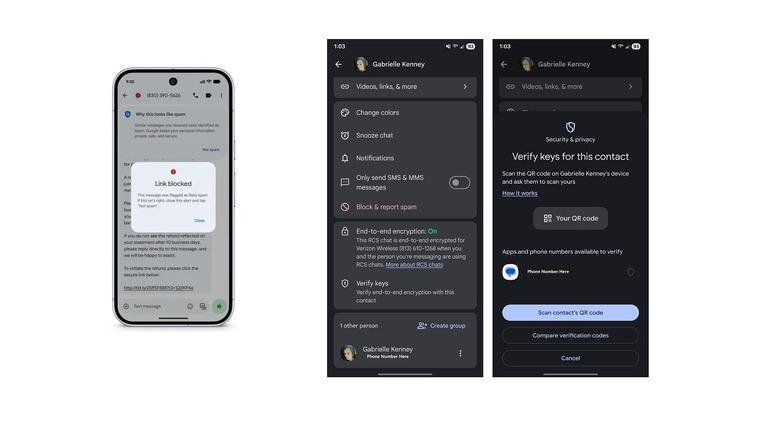

    Screenshot of new Google Messages security features.
    Briley Kenney/BGR

    These features have been incorporated into Google Messages, the company’s default messaging app for Android. While the app comes pre-installed on Pixel and Google devices, that may not be the case for other brands, such as Samsung. If you haven’t already, install Google Messages on your device and set it up by connecting your Google account. It should be noted that these Google Messages features are in addition to the new Android 16 security features added recently.

    The Safer Links and spam protection features are automatically built into Google Messages. As long as you have the latest version of the app, you don’t have to do anything else. When a message comes in that Google flags as spam, it will auto-block the content and move it to a spam menu in the app settings, accessible from profile (icon in top right) > Spam & blocked. In addition, if a trusted contact sends a message with a suspicious link, you’ll receive an alert that it was blocked.

    To use the Key Verifier, open a message thread with the contact you want to verify, or simply open their profile. Tap their icon, scroll down to Verify keys, and in the sub-menu, you can scan their associated QR code, ask them to scan your code, and compare. If the verification codes match, you’re talking to the right contact. You can also check if end-to-end encryption is enabled in the previous menu; you’ll see a big green “on” if it’s active. It’s best to be near your contact to verify — you could check this over a message, but face-to-face is more secure. Overall, the verifier helps you ensure it’s the right person and that communications are protected.


    Android phone Protect Scams Ways
    Share. Facebook Twitter Pinterest LinkedIn Tumblr Email
    Previous ArticleAre You Saving Enough for Retirement? See How Your Contributions Compare to Others Like You
    Next Article What You Learn Becoming Your Mother’s Financial Caregiver
    Finsider
    • Website

    Related Posts

    Tech & Innovation

    Amazon Is Killing A Popular Fire TV Accessory

    January 27, 2026
    Tech & Innovation

    Qualcomm backs SpotDraft to scale on-device contract AI with valuation doubling toward $400M

    January 27, 2026
    Tech & Innovation

    Creators and communities everywhere take a stand against ICE

    January 27, 2026
    Add A Comment
    Leave A Reply Cancel Reply

    Top Posts

    Cursor snaps up enterprise startup Koala in challenge to GitHub Copilot

    July 18, 2025

    What is Mistral AI? Everything to know about the OpenAI competitor

    July 18, 2025

    Analyst Report: Kinder Morgan Inc

    July 18, 2025
    Stay In Touch
    • Facebook
    • YouTube
    • TikTok
    • WhatsApp
    • Twitter
    • Instagram
    Latest Reviews

    Subscribe to Updates

    Get the latest tech news from FooBar about tech, design and biz.

    Most Popular

    Using Gen AI for Early-Stage Market Research

    July 18, 2025

    Cursor snaps up enterprise startup Koala in challenge to GitHub Copilot

    July 18, 2025

    What is Mistral AI? Everything to know about the OpenAI competitor

    July 18, 2025
    news

    Amazon Is Killing A Popular Fire TV Accessory

    January 27, 2026

    Major Stock Indexes Mixed on Busy Earnings Day; UnitedHealth Weighs on Dow; Chip Stocks Power Nasdaq, S&P 500

    January 27, 2026

    GameStop Stock Soars As Burry Reveals Fresh Stake, Social Media Hype Returns

    January 27, 2026

    Subscribe to Updates

    Get the latest creative news from FooBar about art, design and business.

    © 2020 - 2026 The Finsider . Powered by LINC GLOBAL Inc.
    • Contact us
    • Guest Post Policy
    • Privacy Policy
    • Terms of Service

    Type above and press Enter to search. Press Esc to cancel.