

Close Menu
Finsider

    Subscribe to Updates

    Get the latest creative news from FooBar about art, design and business.

    What's Hot

    Nasdaq Nosedives as OpenAI Is Off Target: Stock Market Today

    April 29, 2026

    Samsung’s Next Gen Phones Might Be Getting A Major Audio Upgrade

    April 28, 2026

    9 No-Capital-Gains-Tax States in 2026 Ranked by Cost of Living

    April 28, 2026
    Facebook X (Twitter) Instagram
    Trending
    • Nasdaq Nosedives as OpenAI Is Off Target: Stock Market Today
    • Samsung’s Next Gen Phones Might Be Getting A Major Audio Upgrade
    • 9 No-Capital-Gains-Tax States in 2026 Ranked by Cost of Living
    • BKL buys London practice RBS Chartered Accountants
    • The Average Millennial 401(k) Balance is Not ‘Superbad’
    • Drizzle on top: a new high-end dog food brand is coming for the 1%
    • Nasdaq Notches Another New All-Time High: Stock Market Today
    • I found an app that finally broke my toxic affair with doomscrolling
    Facebook X (Twitter) Instagram Pinterest Vimeo
    Finsider
    • Markets & Ecomony
    • Tech & Innovation
    • Money & Wealth
    • Business & Startups
    • Visa & Residency
    Finsider
    Home»Tech & Innovation»Your Snapchat Memories can be beat-synced in seconds, if you’re on iPhone
    Tech & Innovation

    Your Snapchat Memories can be beat-synced in seconds, if you’re on iPhone

    FinsiderBy FinsiderDecember 18, 2025No Comments2 Mins Read
    Share Facebook Twitter Pinterest LinkedIn Tumblr Reddit Telegram Email
    Your Snapchat Memories can be beat-synced in seconds, if you're on iPhone
    Share
    Facebook Twitter LinkedIn Pinterest Email

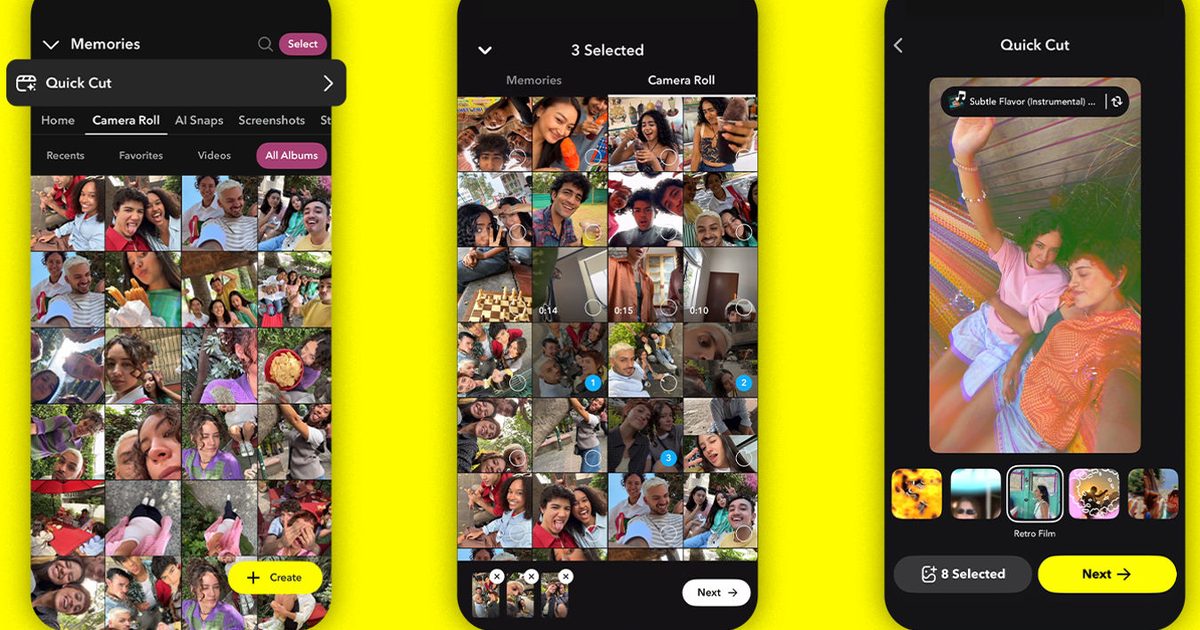
    Snapchat has started rolling out Snapchat Quick Cut iOS, a Lens-powered video creation tool that turns multiple Memories or Camera Roll clips into a beat-synced, ready-to-share video without leaving the app.

    The appeal is speed. After you select your photos or clips, Snapchat generates an instant preview of the rendered edit, so you can get to something shareable fast instead of bouncing through a longer manual workflow.

    The limitation is availability. Quick Cut is iOS-only at launch, and Snap says Android support is coming “soon,” plus expansion to more “surfaces,” but it hasn’t shared dates or a rollout schedule.

    Quick Cut’s iPhone flow, step by step

    On iOS, Quick Cut is built to be easy to start. You can launch it from Memories or your Camera Roll, select multiple items at once, and see a preview immediately after choosing your media.

    From there, the tool leans on Snapchat’s existing creative stack. Quick Cut automatically applies a track from Snapchat’s Sounds library and syncs it to your selected clips. You can customize the result by browsing the Lens carousel or tapping the Sounds pill to pick a different track.

    Snap also adds a social shortcut. If you’re inspired by someone else’s Quick Cut creation, you can unlock the experience from that example and insert your own media into the same style of edit.

    Android is promised, not dated

    For now, Snapchat Quick Cut iOS is the only confirmed version that’s available. Snap’s Android messaging stops at “soon,” with no timing details, no rollout phases, and no region notes attached.

    If you’re on Android, the practical takeaway is to keep expectations grounded. Until Snap attaches a date to the feature, the only real signal will be when it appears in the app after an update. Meanwhile, here’s what rivals are doing.

    Timeline Editor hints at what’s next

    Quick Cut is positioned as part of a bigger push to make in-app creation feel less intimidating. Snap points to Timeline Editor, which it says is now available in Director Mode, as another way it is lowering the barrier to editing inside Snapchat.

    If you’re on iPhone, update Snapchat and check Memories or your Camera Roll to see if Quick Cut has landed for you yet. If you’re on Android, watch update notes.

    beatsynced iPhone memories seconds Snapchat youre
    Share. Facebook Twitter Pinterest LinkedIn Tumblr Email
    Previous ArticleI think this could be the best no-brainer S&P 500 purchase to consider for 2026
    Next Article I’m 73, Retired, and Dreading Winter, But I Can’t Afford to Be a Snowbird. Help!
    Finsider
    • Website

    Related Posts

    Tech & Innovation

    Samsung’s Next Gen Phones Might Be Getting A Major Audio Upgrade

    April 28, 2026
    Tech & Innovation

    I found an app that finally broke my toxic affair with doomscrolling

    April 28, 2026
    Tech & Innovation

    Canonical lays out a plan for AI in Ubuntu Linux

    April 27, 2026
    Add A Comment
    Leave A Reply Cancel Reply

    Top Posts

    Cursor snaps up enterprise startup Koala in challenge to GitHub Copilot

    July 18, 2025

    What is Mistral AI? Everything to know about the OpenAI competitor

    July 18, 2025

    Analyst Report: Kinder Morgan Inc

    July 18, 2025
    Stay In Touch
    • Facebook
    • YouTube
    • TikTok
    • WhatsApp
    • Twitter
    • Instagram
    Latest Reviews

    Subscribe to Updates

    Get the latest tech news from FooBar about tech, design and biz.

    Most Popular

    Using Gen AI for Early-Stage Market Research

    July 18, 2025

    Cursor snaps up enterprise startup Koala in challenge to GitHub Copilot

    July 18, 2025

    What is Mistral AI? Everything to know about the OpenAI competitor

    July 18, 2025
    news

    Nasdaq Nosedives as OpenAI Is Off Target: Stock Market Today

    April 29, 2026

    Samsung’s Next Gen Phones Might Be Getting A Major Audio Upgrade

    April 28, 2026

    9 No-Capital-Gains-Tax States in 2026 Ranked by Cost of Living

    April 28, 2026

    Subscribe to Updates

    Get the latest creative news from FooBar about art, design and business.

    © 2020 - 2026 The Finsider . Powered by LINC GLOBAL Inc.
    • Contact us
    • Guest Post Policy
    • Privacy Policy
    • Terms of Service

    Type above and press Enter to search. Press Esc to cancel.